Function button Logical File
Click this button to branch in the maintenance of cross-client or client-specific file names or paths.
Note:
If you use a server group as executing server, all application servers must have access to the physical path.

Figure: Logical File Definition
Click the SF01 or FILE button to call the corresponding transaction.
This function requires enhanced authorizations to maintain the cross-client tables. The authorization necessary for this function is explained in the description of the required authorizations and roles for the SmartExporter SAP® components administrator. File names or paths can only be changed by an SAP® user with the required authorizations.
During installation no default entries for the cross-client definition are made.
In the SmartExporter SAP Components\Transport\FILENAMECI subfolder on the SAP® Components CD you find a release independent transport request K/R900043.AU6, which you can use to import the configuration described in the following. The installation is run in the same way as the installation of the SmartExporter SAP® components transport requests described in the "Installation Procedure" section.
Below a sample configuration for an operating system independent configuration is described.
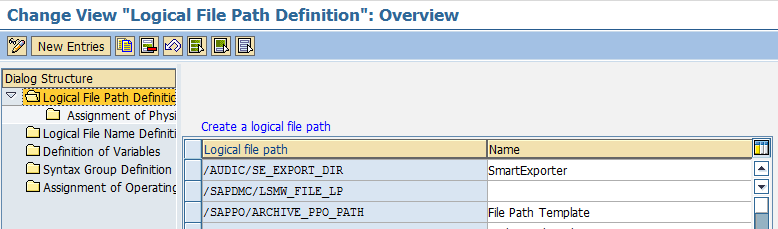
Figure: Logical file path definition
| Assignment of Logical Paths to Physical Path | |
|---|---|
|
Windows |
<V=/AUDIC/SE1>/<SYSID>/<CLIENT>/<FILENAME> |
|
Unix |
<V=/AUDIC/SE2>/<SYSID>/<CLIENT>/<FILENAME> |
Table: Assigning logical paths

Figure: Assignment of physical path to logical path
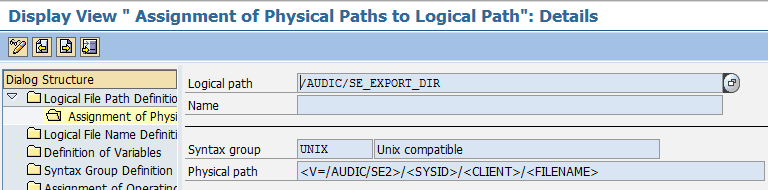
Figure: Assignment of physical paths to logical path in the detailed view
| Cross-client logical file names | |
|---|---|
|
Logical file cross-client |
/AUDIC/SE_EXPORT_FILE |
|
Name |
SmartExporter export file |
|
Data format |
ASC |
|
Logical path |
/AUDIC/SE_EXPORT_DIR |
Table: Assignment of logical file names - cross-client
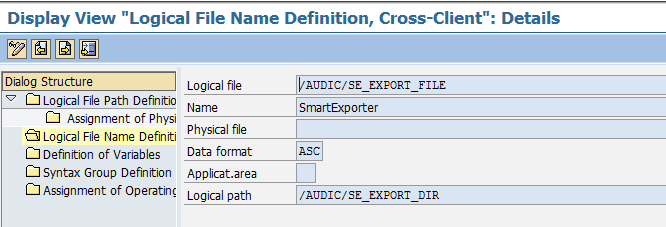
Figure: Assignment of cross-client logical file names
In more recent versions of the SAP_BASIS component you can use the DIR value for the data format. In this case the defined path will always be validated internally by calling the FILE_VALIDATE_NAME function module before file access is granted. This prevents unauthorized access to files outside the defined path.
| Variables | |
|---|---|
|
/AUDIC/SE1 |
D:\Temp |
|
/AUDIC/SE2 |
/usr/ase |
Table: Variables
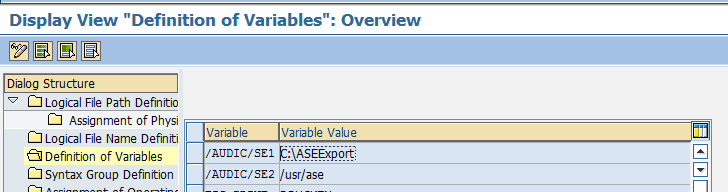
Figure: Definition of Variables
It might be sufficient to simply adjust the variables corresponding to the operating system of the application server(s). In Windows for example:
/AUDIC/SE1 = X:\SEExport
Using a SID = XXX with the 999 client the following path is used:
X:\SEExport\XXX\999
You have to make sure that this path exists and that the SAP® system has the authorization to read and write on this path. If you use a Windows operating system, the user <DOMAIN>\SAPService<SID> or the groups <DOMAIN>\SAP_LocalAdmin, <DOMAIN>\SAP_<SID>_LocalAdmin or <DOMAIN>\SAP_<SID>_GlobalAdmin must have the corresponding rights for the directory. For Unix (Linux, AIX, OS400, etc.) this user is <SID>adm or the group sapsys.
Additionally, you can use the PARAM_1 parameter when defining the physical path. In this parameter the user name of the SAP® process is transferred. You just have to make sure that the corresponding folder structure and the authorizations are available.
You can adjust this configuration client-specifically using the SF01 transaction. Configuration details depend on the environment of the SAP® system and have to be modified individually.
Copyright © 2019 Audicon GmbH. All rights reserved.