Open topic with navigation
To create or modify a header or footer
- On the Edit menu, select Header/Footer.
- Under Type, choose either Header text or Footer text.
- In the Header/Footer Number box, enter a header or footer number.
-
Click OK to access the header/footer window.

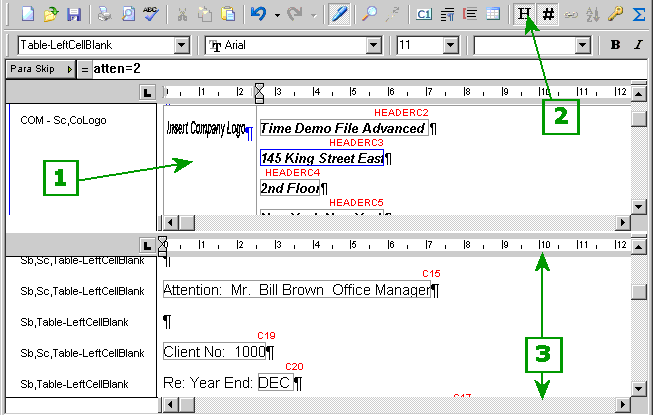
-
[#1] This is the header/footer window. It behaves like a mini-document because it can contain both text and cells.
-
[#2] Click the Header tool to open or close the header/footer window.
-
[#3] This is the document window.
- Format the header or footer. You can format the header or footer text and cells as you would any text and cells in any document. For example, you can use tab stops to position cells.
- On the Edit menu, select Close Header/ Footer.
Header/Footer List
The Header Footer List can also be used to change the selection for the header or footer currently in use. The Headers and Footers list in CaseView has been modified to display the headers and footers that are in use separately from those that have not yet been used. When the drop-down is opened, used headers and footers are immediately available while unused ones are available at the bottom of the list if the category is expanded.
Note
- If your document has pages that are oriented to either landscape layout or portrait layout under various circumstances, you can create two separate headers – one designed for landscape pages and one designed for portrait pages. Then use the ability to attach conditions to your headers to specify the header that should be printed, based on the orientation of the page at the time of printing. See Attaching a Header or Footer for more details.
Related Topics